
Caribou Coffee®
Caribou CoffeeFood & Drink
4.86.59K Reviews
- Version
- 5.12.5
- Installs
- 500.00K
- Age Rating
- Everyone
Screenshots
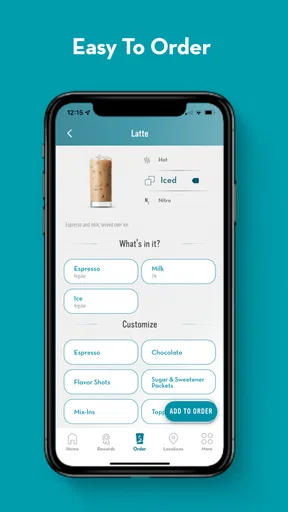
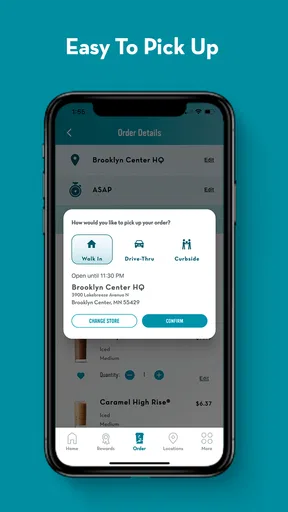
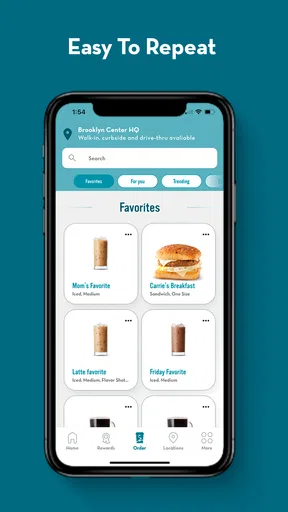
Our Review of Caribou Coffee®
 Analysis by Appyee
My first impression of Caribou Coffee® was that it is built for a very specific moment: I already know where I want my coffee, I want to adjust the order without standing in line, and I would rather collect it than spend extra time at the counter. That focus makes the app easy to understand, but it also means its value depends heavily on whether Caribou Coffee is part of your normal routine.
This is a free Food & Drink app from Caribou Coffee, with an Everyone age rating. It has reached over 500 thousand installs and holds a 4.8 average from around 39 thousand ratings, so it clearly appeals to more than just occasional visitors. I found the experience most useful when treating it as a practical ordering companion rather than as a general coffee-discovery app.
What to expect before placing your first order
The central idea is straightforward: use the app to customize a Caribou Coffee order, pay through the app, and pick it up. That sounds simple, and in everyday use it generally is. The important thing is to approach it with the right expectation. It is not a replacement for every part of the café experience; it is a way to make a planned visit more convenient.
If I am walking past a café and still deciding what I want, ordering at the counter can sometimes be quicker. I can ask a question, change my mind, or let the barista guide me. The app becomes more useful when I am commuting, working on a schedule, or ordering the same drink with the same adjustments that I have already figured out.
The developer, Caribou Coffee, keeps the product closely tied to its own café menu. That is an advantage for regular customers because the ordering process stays focused. It is less useful for someone looking for several coffee chains in one place, comparing independent cafés, or browsing a broad restaurant marketplace.
I also like that the app is free to install and use. The free price removes the main barrier to trying it, although the cost of the drinks themselves remains part of the normal café purchase. The current version is 5.12.5, and the app supports devices running Android 8.0 or later. For someone using an older phone, checking compatibility before planning around mobile ordering is sensible.
Who will get the most from it
The best match is a repeat customer who has a predictable route and wants fewer steps during a busy morning. It can also suit anyone who needs to make detailed drink choices calmly, especially when building an order at a crowded counter feels rushed. I found the customization-first approach more comfortable than trying to explain every preference aloud while other customers are waiting.
It is a weaker fit for people who rarely visit Caribou Coffee, enjoy spontaneous café conversations, or want one app that covers many nearby restaurants. If your usual coffee stop changes every day, the convenience of learning one chain’s ordering flow may not compensate for the narrower selection.
Setting it up without overthinking the process
For a first-time user, I would begin by installing the app and opening it when I have a few quiet minutes, not while already standing outside the café. The first useful goal is not to explore every screen. It is to get familiar with the menu, choose a pickup location, and understand how a customized order moves toward payment.
Location selection deserves attention. A small mistake here can undermine the whole point of ordering ahead. I would check the café name and location before confirming anything, particularly if several Caribou Coffee shops are near a workplace, shopping area, or major road. The app is convenient only when the selected pickup point matches the place I am actually heading toward.
When browsing the menu, I recommend starting with one familiar drink rather than experimenting with several items at once. That gives you a clear reference for how the app presents sizes, additions, and other available choices. After that first successful order, exploring becomes much less intimidating because you know what the confirmation flow looks like.
Payment is another step worth completing before a rushed visit. I prefer to handle account and payment details at home, then use the app when I am already on the move. This separates setup from the actual coffee run and reduces the chance that I will abandon the order because I am trying to solve several small tasks at once.
A practical first-use routine
Open the menu and choose a drink or food item you already understand.
Select the café where you genuinely plan to collect the order.
Review every customization instead of assuming the default is correct.
Check the order summary and payment step carefully.
Use the pickup information as your final confirmation before leaving for the café.
This routine may sound cautious, but it prevents the most frustrating beginner mistake: completing a perfectly accurate order for the wrong location or with one overlooked adjustment. Once the process feels familiar, the same workflow becomes quick enough for regular use.
Getting to the first meaningful success
For me, the first meaningful success is not merely installing the app. It is completing one sensible order and collecting it without needing to restart the process. I would choose a drink I have ordered before, keep the customizations limited to preferences I can describe clearly, and avoid testing several unfamiliar menu items during that first attempt.
Customization is where the app earns its place. Instead of relying on memory or trying to communicate a long list at the counter, I can make choices in a more deliberate order. That is especially helpful when a small change matters to me. The trade-off is that more choices require more checking. Convenience does not remove responsibility; it moves the decision-making earlier in the process.
A realistic example would be a weekday commute. I know I will pass a Caribou Coffee café shortly before work, and I have enough time to place an order while leaving home. I select the location along my route, choose my usual drink, review the customizations, pay, and then collect it when I arrive. In that situation, the app turns an uncertain queue into a planned stop.
That workflow is also useful for a short break during the workday. If I have only a limited amount of time away from my desk, I can decide on the order before walking over. The benefit is not just speed; it is predictability. I know what I requested and can focus on reaching the correct café rather than making every decision at the register.
My advice is to keep the first order deliberately boring. A familiar order makes it easier to identify whether the app itself works for you. If the first attempt includes an unfamiliar drink, several modifications, and a new pickup location, it becomes difficult to tell whether confusion comes from the app or from the order.
How I use customization more safely
I treat customization as a checklist rather than a playground. I first choose the base item, then review the available changes, and finally inspect the complete summary. This matters because it is easy to remember the one adjustment you wanted while overlooking another selection that remained at its default.
For repeat orders, I would pay attention to which combinations I actually enjoy instead of changing something every time. The app’s strongest practical role is helping me reproduce a known order with less effort. If I am still deciding what I like, the café counter may be a better place to ask questions and learn.
There is also a useful trade-off between speed and control. Ordering in advance gives me more time to make choices, but it can make an incorrect selection feel more consequential because the order is already moving through the process. I therefore review the location, item, modifications, and payment before treating the order as final.
Small points that can confuse new users
The phrase “pick up” can sound more automatic than it really is. The app helps me place the order and directs me toward collection, but I still need to go to the selected café and pay attention to the pickup instructions shown in the app. It is not a delivery service, and it should not be treated as one.
Another common misunderstanding is assuming that mobile ordering is always the fastest option. If I am already at the counter and there is no queue, placing an order on my phone can add unnecessary steps. The app is most effective when it lets me prepare before arrival or avoid a line, not when I use it automatically for every visit.
Menu familiarity also affects the experience. A regular customer may move quickly because the choices make sense immediately. A first-time visitor may need more time to understand what each item and customization means. I would not judge the app harshly for that learning curve, but I would choose a quiet moment for the first setup.
There is a similar issue with location. A pickup order is tied to the café I select, so I would not place it until I am confident about my route. This is particularly important when I am traveling, changing plans, or ordering for someone else. A convenient interface cannot compensate for an incorrect destination.
Payment can create its own hesitation for first-time users. I prefer to confirm that the final order summary looks right before completing the transaction, rather than assuming that every change was applied exactly as intended. That extra glance is quick and gives me confidence that the drink I collect matches the drink I meant to request.
When the usual alternatives are better
The traditional counter is better when I need personal advice, want to ask about an unfamiliar menu item, or have a request that is easier to explain face to face. It is also the natural choice when I have not decided what I want. In those cases, the app’s structured choices may feel restrictive compared with a conversation.
A broad restaurant-ordering app may be better when I am comparing cafés, adding food from different businesses, or coordinating a larger meal. Caribou Coffee’s app is more focused, which makes it cleaner for Caribou orders but less flexible for mixed plans.
For a regular Caribou Coffee customer, however, the focused approach is exactly the advantage. I do not need to sort through unrelated restaurants, and I can concentrate on the items and pickup plan that matter for that visit. The right choice depends on whether I value chain-specific convenience or broad marketplace variety.
What to do after the first successful order
After collecting the first order, I would not immediately try to optimize everything. I would first decide whether the app genuinely saved time or made customization easier. If it did, the next step is to repeat the same workflow on another normal visit, using a familiar location and order. Repetition shows whether the benefit is dependable rather than a one-time novelty.
Once the basic routine works, I would explore more of the menu at home. This is where the app can be more useful than a hurried counter interaction: I can consider alternatives when I am not blocking a line. I still recommend changing one part of an order at a time, because that makes it easier to remember what worked.
For people ordering for a companion, the app can also make the division of decisions clearer. I can confirm the drink, adjustments, pickup café, and payment before leaving. That is more reliable than trying to remember someone else’s detailed order while walking or commuting. The limitation is that both people need to agree on the selected location and final choices before submission.
I would also keep the app as a tool for planned visits rather than a reason to visit more often. Its convenience is practical, not magical. It can reduce friction around an order I already intend to make, but it does not make every purchase better than the alternatives. That distinction helps keep expectations realistic.
The app’s long availability since its release on April 3, 2015, and its current version show that it is an established part of Caribou Coffee’s digital experience. Its strong average rating and substantial review activity suggest that many customers find the approach worthwhile. I still think personal fit matters more than popularity: the key question is whether you regularly use Caribou Coffee and appreciate ordering ahead.
My overall recommendation is simple. If Caribou Coffee is already one of your regular stops, install the free app, prepare your first order when you are not rushed, and begin with a familiar drink. Check the café location and final customization summary every time until the process becomes second nature. If you prefer spontaneous recommendations, visit many different cafés, or want delivery and restaurant variety in one place, ordering directly at the counter or using a broader service may suit you better.
For the right user, the biggest strength is controlled convenience: I can make a considered Caribou Coffee order before arriving and collect it with fewer decisions at the café. That is a modest promise, but the app delivers value precisely because it stays focused on that everyday task.
Verdict
Strengths of Caribou Coffee®
- Easy access to nearby cafés, menus, and opening hours.
- Mobile ordering can save time during busy morning visits.
- Rewards make frequent purchases more worthwhile.
- The app supports convenient pickup options at participating locations.
- Seasonal drinks and offers are easy to discover in one place.
Limitations of Caribou Coffee®
- Some features may vary depending on your selected café.
- Pickup estimates can change during peak periods.
- Rewards and promotions may have regional restrictions.
- The app requires an account for ordering and loyalty benefits.
- Menu availability may not always reflect real-time stock.
Similar Picks in This Category
View All
Rappi: Food Delivery, Grocery
Rappi, Inc - Delivery3.5

McDonald’s: Cupons e Delivery
Arcos Dorados4.3

Swiggy: Food Instamart Dineout
Swiggy4.7

Blinkit: Groceries & more
Blinkit4.8

foodpanda: food & groceries
Foodpanda GmbH a subsidiary of Delivery Hero SE4.0

Zomato: Food Delivery & Dining
Zomato4.7
Frequently Asked Questions
What is the Caribou Coffee® app used for?
The Caribou Coffee® app is designed to make ordering and earning rewards more convenient. After signing in, you can browse the menu, customize drinks and food, place a pickup order at participating locations, and manage your Caribou Perks® account. It also helps you find nearby cafés, view available offers, and check your rewards balance before visiting a store.
Can I order Caribou Coffee® drinks and food through the app?
Yes, the app supports mobile ordering at participating Caribou Coffee® locations. You can select a café, choose items from the available menu, customize options such as size or ingredients, and select a pickup method when offered. Menu availability, ordering features, and estimated preparation times may vary by location, so it is worth confirming the selected café before submitting your order.
How does the Caribou Perks® rewards program work in the app?
The app connects your account with Caribou Perks®, allowing you to earn and redeem rewards according to the program’s current terms. Members can generally review their progress, access eligible offers, and apply available rewards during qualifying purchases. Rewards and promotions may have expiration dates or location restrictions, so check the details shown in the app before placing an order.
Does the Caribou Coffee® app offer deals or exclusive promotions?
The app may provide members with personalized offers, promotional rewards, and other benefits connected to the Caribou Perks® program. The exact promotions can change over time and may depend on your account, location, purchase history, or campaign eligibility. Before relying on a discount, open the offer and read its conditions, including expiration dates and any minimum purchase requirements.
Is the Caribou Coffee® app free, and what should I know before downloading it?
The Caribou Coffee® app is generally free to download, although normal mobile data charges may apply if you use it without Wi-Fi. You will likely need an account to use features such as mobile ordering and rewards management. Availability can differ by country, device, and store location, while some features require internet access and may depend on participating cafés.
